[CodeWithSwiz 19] Firebase Auth support in useAuth, pt1
Support for Firebase Auth is one of the most requested features for useAuth and I figured what the heck, how hard can it be?
CodeWithSwiz is a weekly live show. Like a podcast with video and fun hacking. Focused on experiments. Join live Mondays
Friend, it can be very hard. Google docs are shit. The perfect example of For Engineers, By Engineers.
You find out everything that's possible. All the little trees, every detail. Want user/pass auth? Here's the code. Email link? Do this. OAuth with xyz provider? Here.
You know what they don't say?
How to set up fricken Firebase 😡
The setup
// Initialize the FirebaseUI Widget using Firebase.
var ui = new firebaseui.auth.AuthUI(firebase.auth())
Ok Google, how do I import this? Where's my API key?
Is there Google magic afoot and they can guess? Ask me after initialization like the Netlify Identity widget can?
Nope.
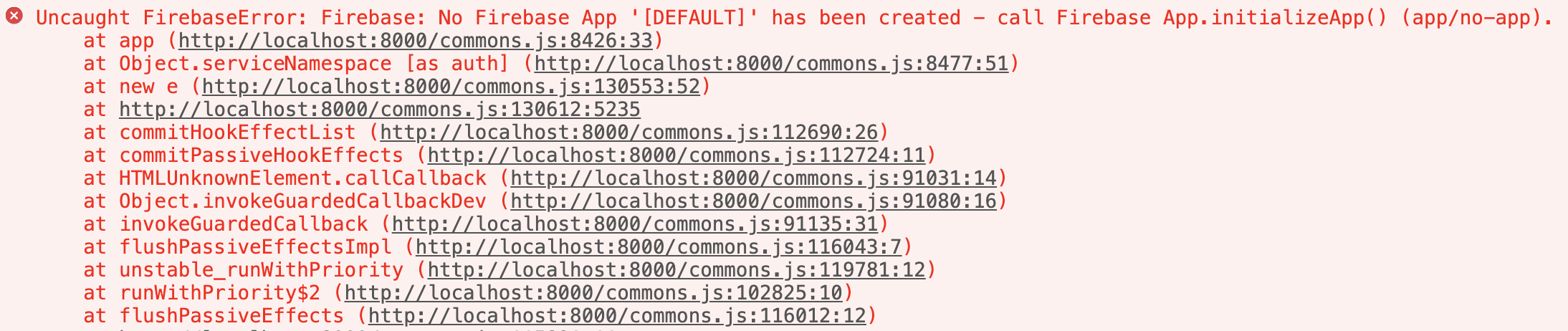
We later found the right docs to follow for initial setup. Even explains how to correctly import for a smaller bundle size.
pt2 will go swimmingly 💪
Creating an auth provider for useAuth
My favorite result of refactoring useAuth from React.Context to XState is that we can support multiple auth providers. Core logic is the same, details pluggable.
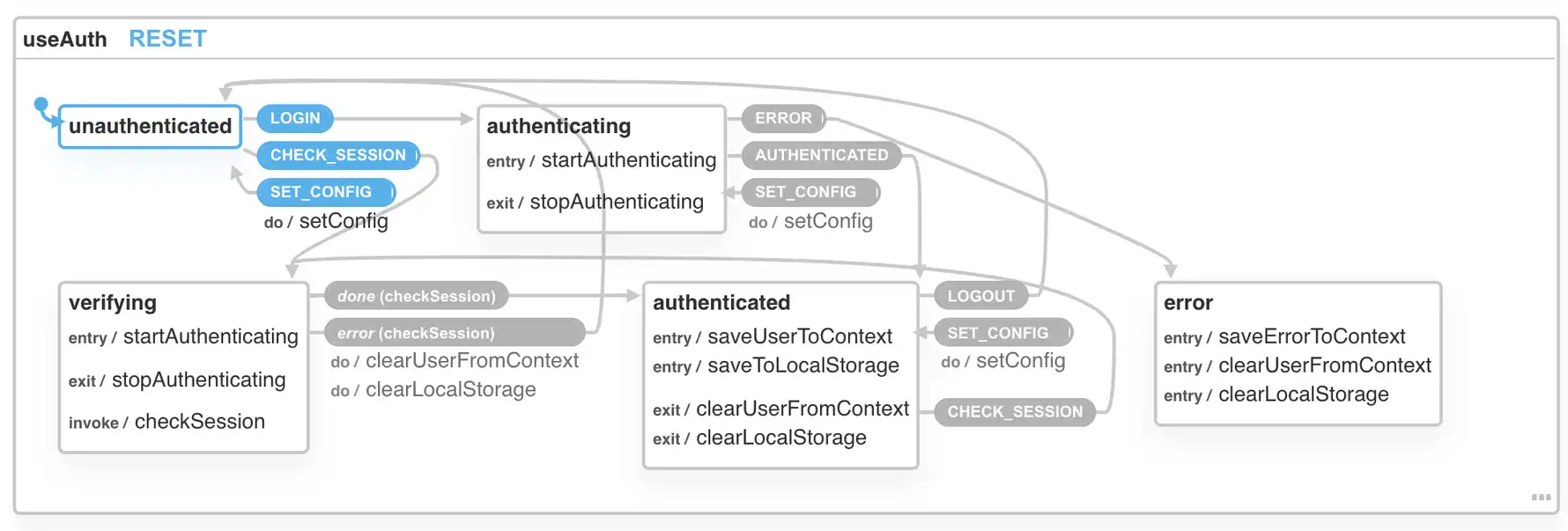
There's an abstraction layer and basic documentation on what to do. We're putting my docs to the test 😅
1. stub your provider
You start with copypasta of the abstract implementation.
// src/providers/YourThing.ts

// Auth Wrapper for Auth0
export class Auth0 implements AuthProviderClass {
  private auth0: Auth0Client.WebAuth
  private dispatch: (eventName: string, eventData?: any) => void
  // Auth0 specific, used for roles
  private customPropertyNamespace?: string
  // Initialize the client and save any custom config
  constructor(params: AuthOptions) {
    // You will almost always need access to dispatch
    this.dispatch = params.dispatch
    // Auth0 specific, used for roles
    this.customPropertyNamespace = params.customPropertyNamespace
    // Init your client
    this.auth0 = new Auth0Client.WebAuth({
      ...(params as Auth0Options),
    })
  }
  // Makes configuration easier by guessing default options
  static addDefaultParams(params: ProviderOptions, callbackDomain: string) {
    const vals = params as Auth0Options
    return {
      redirectUri: `${callbackDomain}/auth0_callback`,
      audience: `https://${vals.domain}/api/v2/`,
      responseType: "token id_token",
      scope: "openid profile email",
      ...vals,
    }
  }
  public authorize() {
    // Open login dialog
  }
  public signup() {
    // Open signup dialog
  }
  public logout(returnTo?: string) {
    // Logs user out of the underlying service
  }
  public userId(user: Auth0UserProfile): string {
    // Return the userId from Auth0 shape of data
  }
  public userRoles(user: AuthUser): string[] | null {
    // Return user roles from Auth0 shape of data
  }
  public async handleLoginCallback(): Promise<boolean> {
    // Handle login data after redirect back from service
    // Dispatch ERROR on error
    // Dispatch AUTHENTICATED on success
    // include the user object and authResult with at least an expiresIn value
  }
  public async checkSession(): Promise<{
    user: Auth0UserProfile
    authResult: Auth0DecodedHash
  }> {
    // verify session is still valid
    // return fresh user info
  }
}
2. fill abstract implementation
Fill in those methods to fit your auth provider. Here's what we tried for Firebase Auth. Don't know yet if it works.
// src/providers/FirebaseUI.ts

constructor(params: AuthOptions) {
    // You will almost always need access to dispatch
    this.dispatch = params.dispatch;

    // Init your client
    this.ui = new FirebaseAuthUI.AuthUI(firebase.auth());
}

public authorize() {
    // Open login dialog
    this.ui.start("#firebaseui-auth-container", {
        signInOptions: [firebase.auth.EmailAuthProvider.PROVIDER_ID]
    });
}
Don't quote me on that yet :)
3. use the provider
Use in your app. We created a Gatsby-based example on stream
// gatsby-browser.js
export const wrapRootElement = ({ element }) => (
  <ThemeProvider theme={theme}>
    <AuthConfig
      authProvider={FirebaseUI}
      navigate={navigate}
      params={
        {
          /* ... */
        }
      }
    />
    {element}
  </ThemeProvider>
)
Render <AuthConfig> and provide the new auth provider. We don't know yet which params Firebase Auth is going to use. Find out next time :)
4. contribute to useAuth 🙏🏻
To contribute the FirebaseUI auth provider to the core library we needed an extra step 👉 adding it to the library.
That happens in package.json:
    "source": [
        "src/providers/auth0.ts",
        "src/providers/NetlifyIdentity.ts",
        "src/providers/FirebaseUI.ts",
        "src/index.ts"
    ],
    // ...
    "files": [
        "src",
        "dist",
        "auth0.js",
        "netlify-identity.js",
        "firebase-ui.js"
    ],
The "source" config tells microbundle to build FirebaseUI.ts as its own library. Creates a bunch of files in dist/* that aren't connected with the rest.
The "files" config tells NPM to keep ./firebase-ui.js when publishing. That file is a hack.
// ./firebase-ui.js

// this is a hack to improve DX
// TODO: figure out a better way
const { FirebaseUI } = require("./dist/FirebaseUI")
module.exports = { FirebaseUI }
Only way I could find to:
- Reduce bundle size and let you use different providers without installing all of them
- Have understandable imports like
import FirebaseUI from "react-use-auth/firebase-ui"
If you know a better way please hit reply.
In conclusion
Understanding beats knowledge. Knowing how several details of Firebase work, does not mean you can make it fit together.
Keep that in mind next time you write docs for your team.
Cheers,
~Swizec
PS: it's beyond cool that TypeScript lets you define "An auth provider must conform to this API" and enforces it at the compiler level. Makes this way easier 😍