How JavaScript linters cause bugs
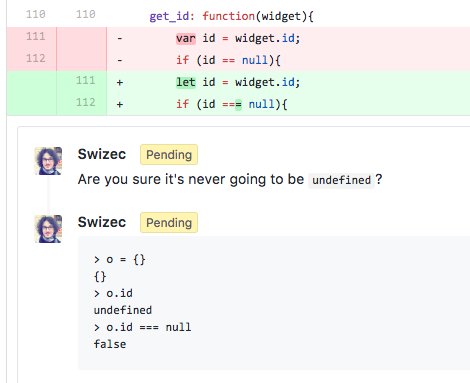
I was doing code review for a coworker, and it soon became obvious that he used a linter and that the linter gave him a bright idea: use strict comparisons.
Using strict comparisons is a great rule to follow. === instead of ==, !== instead of !=. Your life will be better.
You're ensuring not only that your values are equal or unequal, you ensure their types match as well. Because JavaScript has funny types, strict comparison lets you avoid painful pain.
Things like this:
    > "0" == 0
    true
And like this:
    > true == 1
    true
    > false == 0
    true
Even things as silly as this:
    > new Array() == 0
    true
    > [] == 0
    true
Run a linter on those examples, and it will sagely say "Dude, use strict comparison. ALWAYS use strict comparison.”
And your linter would be right. === fixes all of those examples.
    > "0" === 0
    false
    > true === 1
    false
    > false === 0
    false
    > new Array() === 0
    false
    > [] === 0
    false
👌 Problem solved. 👌
But here's one situation where it gets tricky. Checking undefinedness:
null == undefined true null === undefined false
Under loose comparison, null and undefined are equal. Under strict, they're not.
This can cause all sorts of issues.
Here are some examples I found in my coworker's PR. 👇
const url = $(elem).data("url")
if (url !== null) {
  // ...
}
But if your elem doesn't have a data-url="..." attribute, jQuery returns undefined, not null. Strict comparison fails.
A better approach is to use if (url) because undefined is falsey and so is an empty string. That makes your code robust against data-url="" :)
function scroll({ elem, offset, duration }) {
  duration = duration !== null ? duration : 2000
}
But if you call scroll() without duration, it's undefined, and your code breaks. No default duration for you. A better approach is to use destructuring defaults, like this: function scroll({ elem, offset, duration = 2000 }).
function get_id(widget) {
  let id = widget.id
  if (id !== null) {
    // ...
  }
}
But reading an inexistent object property returns undefined, not null, and this code breaks. Once more, you're better of relying on inherent falsiness 👉 if (id).
function createWidget(defaultText, onClick, markBusy) {
  new Widget({
    text: defaultText,
    onClick: onClick,
    markBusy: markBusy !== null && markBusy,
  })
}
This one is tricky. It's trying to pass markBusy into the Widget constructor, but only if it's defined. You can't use default param values because there's no destructuring so hmm… 🤔
Then again, the whole exercise is futile. You can achieve the same effect if you rely on inherent falseyness: markBusy: !!markBusy.
I guess my point is that you have to be careful. Don't blindly trust your linter when it says change this code to that code.
Happy hacking 🤓