Reader question: useReducer or XState?
Following up from When your brain is breaking, try Stately.ai, fellow reader S. asked if useReducer could ever be relevant when using state machines in React code.
Yes!
You can use useReducer to implement a state machine and clean up your ternary soup. It won't have the safety guarantees of XState or the built-in support for side effects (called actions in xstate), but it's going to be a state machine.
State machines are a way of thinking about your code. They don't care about implementation details. As I wrote in February – you're building state machines even if you don't know it.
When Moore invented state machines in 1956 programming was done with pen and paper first. You didn't have time for trial and error. When a computer ran your code, it better be right. Hell, FORTRAN (first compiled language) didn't even come out until 1957.
useReducer state machine example
Using the same example as before, you start with a render like this:
return (
  <div>
    {isLoading && <Spinner />}
    {!isLoading && !data && <NotFound />}
    {!isLoading && isError && <Ooopsies />}
    {!isLoading && data && (
      <>
        <List data={data} count={10} />
        {!showMore && <Button onClick={onShowMore} />}
      </>
    )}
    {!isLoading && data && showMore && (
      <>
        <List data={data} count={data.length} />
        <Button onClick={onHideMore} />
      </>
    )}
  </div>
)
and would prefer to have code like this:
switch (state) {
  case "loading":
    return <Spinner />
  case "not_found":
    return <NotFound />
  case "error":
    return <Ooopsies />
  case "show_less":
    return (
      <>
        <List data={data} count={10} />
        <Button onClick={showMore} />
      </>
    )
  case "show_more":
    return (
      <>
        <List data={data} count={data.length} />
        <Button onClick={showLess} />
      </>
    )
  default:
    return <Spinner />
}
I think that's easier to work with. You may disagree, lots of people do 😅 Personally I like code that doesn't make me feel smart.
To support that with a useReducer, you'd write a state machine like this:
function reducer(state, action) {
  if (state === "loading") {
    switch (action.type) {
      case "loaded":
        if (action.data.length === 0) {
          return "not_found"
        } else {
          return "loaded"
        }
      case "error":
        return "error"
    }
  }

  if (state === "loaded") {
    switch (action.type) {
      case "show_more":
        return "show_more"
    }
  }

  if (state === "show_more" && action.type === "show_less") {
    return "show_less"
  }

  if (state === "show_less" && action.type === "show_more") {
    return "show_more"
  }
}
If you look carefully, draw a picture of possible transitions, and I didn't make mistakes, you'll get the same animation as last time:
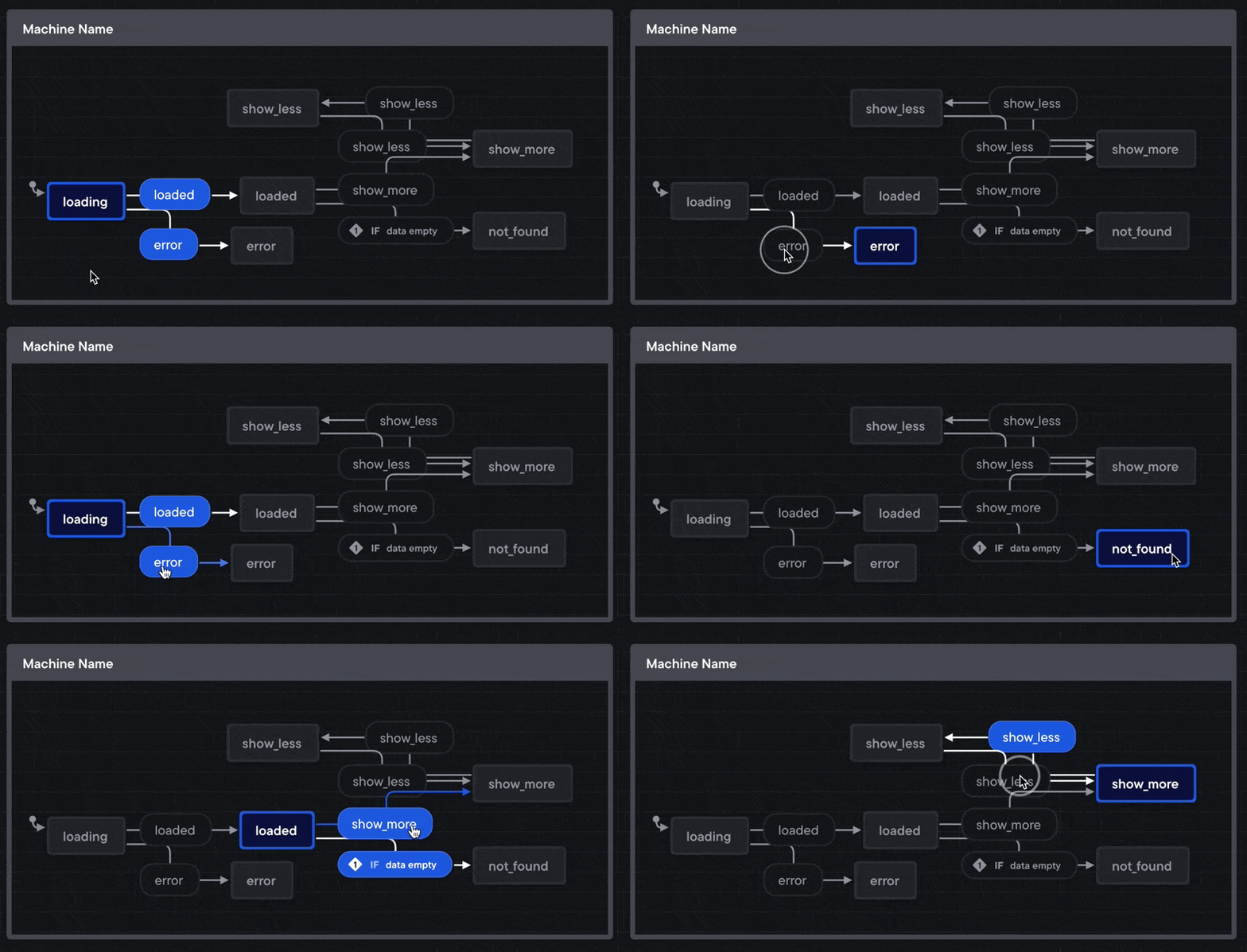
The useReducer hook lets you use this in a React component:
// init with the "loading" state
const [state, dispatch] = useReducer(reducer, "loading")
All that remains is to call dispatch with the right actions at the right moments. Either by integrating deeply with your data loading or relying on useEffect when values change.
As implemented, the reducer() expects calls like dispatch({type: 'error'}).
Cheers, ~Swizec
PS: a few readers complained the Stately article was an ad. It wasn't. I just liked it and thought you might too
PPS: here's a series of articles and videos on refactoring a useReducer to XState