Refactoring a useReducer to XState, pt1 – CodeWithSwiz 11
XState promises to be like useReducer+Context combined and the simplest way to handle complex state in React apps. But can it deliver? On this episode of #CodeWithSwiz, we gave it a shot.
CodeWithSwiz is a twice-a-week live show. Like a podcast with video and fun hacking. Focused on experiments. Join live Wednesdays and Sundays
useAuth was always meant to become the best way to add authentication to your React and JAMStack apps. Regardless of auth provider.
But as time passed, contributors grew (up to 19), pull requests mounted (70 closed or merged 🤘), and bugs got fixed, the codebase became a mess. Hard to reason about, difficult to understand, bleh to work with.
It was time to refactor. And When your brain is breaking, try XState
1: Housework
We started in ep10 with housework.
Merge existing PRs, verify tests work, fix lingering bugs. Anything that could lead to merge conflicts after a large change to the codebase.
You don't want to leave your contributors hanging.
Among the neglected pull requests we found a fantastic candidate for a useAuth docs page! Thanks Eric Hodges, you're amazing 😍
You can try it on his demo deploy 👆
2: Identify possible states
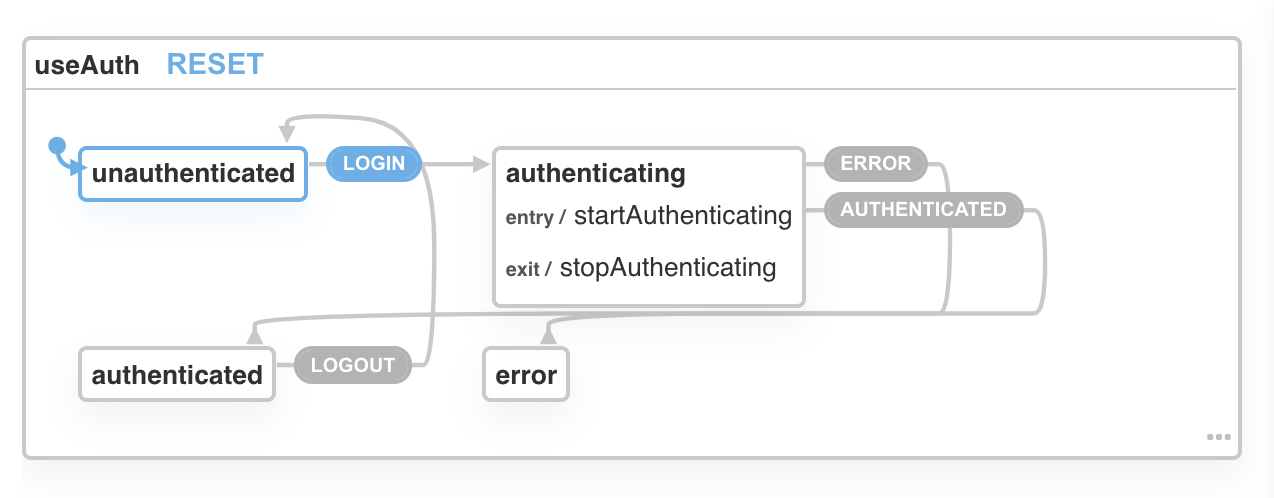
Refactoring a useReducer to XState starts by identifying your states. Each case corresponds to a transition between states.
export const authReducer = (
  state: AuthState,
  action: AuthAction
): AuthState => {
  switch (action.type) {
    case "login":
    // ...
    case "logout":
    // ...
    case "stopAuthenticating":
    // ...
    case "startAuthenticating":
    // ...
    case "error":
    // ...
    default:
      return state
  }
}
Your XState state machine will have N-1 states.
const authMachine = Machine<AuthState>(
  {
    id: "useAuth",
    initial: "unauthenticated",
    // ...
    states: {
      unauthenticated: {},
      authenticating: {},
      authenticated: {},
      error: {},
    },
  }
  // ...
)
A user can be either unauthenticated, authenticating, authenticated, or there's an error. No other state exists.
3: Define transitions between states
You can read transitions from the reducer. Each case becomes an XState transition.
Harder is identifying what they transition from and to. Reducers hide that info in the gaggle of returned state. You have to read the code and understand its intent.
states: {
    unauthenticated: {
        on: {
            LOGIN: "authenticating"
        }
    },
    authenticating: {
        on: {
            ERROR: "error",
            AUTHENTICATED: "authenticated"
        },
    },
    authenticated: {
        on: {
            LOGOUT: "unauthenticated"
        }
    },
    error: {}
}
If you're unauthenticated and trigger LOGIN, you get to authenticating. From there you can either get AUTHENTICATED or an ERROR. To get out of the authenticated state, you have to LOGOUT.
Isn't that more readable?
XState's visualizer even draws helpful diagrams.
4: Move your state into context
Final step is moving what you used to think of as "state" into the state machine context.
You can think of context as the meta state. The application state that your state machine states correspond to.
Best copied from your TypeScript definition of the reducer's state ✌️
const authMachine = Machine<AuthState>(
    {
        // ...
				context: {
				    user: {},
				    expiresAt: null,
				    authResult: null,
				    isAuthenticating: false,
				    error: undefined,
				    errorType: undefined
				},
XState docs call this the infinite state next to the finite state of a state machine. I like "application state".
This is where you store the values that you care about.
On stream we got as far as manipulating the isAuthenticating flag as a side-effect of the authenticating state. Might be unnecessary now that's an explicit state, but made for a good playground.
const authMachine = Machine<AuthState>(
  {
    // ...
    states: {
      // ...
      authenticating: {
        on: {
          ERROR: "error",
          AUTHENTICATED: "authenticated",
        },
        entry: ["startAuthenticating"],
        exit: ["stopAuthenticating"],
      },
      // ...
    },
  },
  {
    actions: {
      startAuthenticating: assign((context) => {
        return {
          isAuthenticating: true,
        }
      }),
      stopAuthenticating: assign((context) => {
        return {
          isAuthenticating: false,
        }
      }),
    },
  }
)
Adding entry and exit effects to the AUTHENTICATING action tells XState to call the startAuthenticating and stopAuthenticating actions.
They're set up with the assign() action creator from XState. I figured out this exact incantation off stream. Docs were confusing as heck on stream and making it play with TypeScript was hell.
5: Accessing XState context to read application state
You can't access context directly.
That means you'll have to either .subscribe to changes or use a dirty side effect in an .onTransition call.
Here's a test that works to verify the authenticating entry side-effect.
it("changes isAuthenticating to true", () => {
  let context = { isAuthenticating: false }

  authMachine
    .onTransition((state) => {
      context = state.context
    })
    .send("LOGIN")

  expect(context.isAuthenticating).toBe(true)
})
Notice how I'm storing a value in a variable when onTransition runs. That can get messy and I'm not sure yet how we'll use it to make the authMachine a drop-in replacement for authReducer.
Want to make this refactor invisible to users of useAuth 😊
Fin
In conclusion, XState is like an inverted useReducer. Cases become transitions, the space between cases becomes state machine states, reducer state becomes context.
Cheers,
~Swizec
PS: continue reading with part 2 👉 How to write tests for XState